
739 字
4 分钟
🛠️ 修复Twikoo在Fuwari中的bug
前言
花了一下午的时间也是把博客从Hexo迁移至Fuwari了,使用了Twikoo给博客添加评论系统,但是效果不尽人意。
问题
Twikoo的评论系统中包含“点赞”、“回复”等按钮,点击这些按钮会导致自动跳转至页面顶部的问题。
原因出自Twikoo的官方版本对于这些按钮使用了包含链接href="#"的a标签。需要修改的方法也很简单,将#改成javascript(0)就可以了。
修复方法
复制仓库
git clone https://github.com/twikoojs/twikoo.git修改源码
需要对twikoo源码中TkAction.vue、TkComment.vue、TkAdmin.vue三个文件进行修改
<template> <div class="tk-action"> <a class="tk-action-link" :class="{ 'tk-liked': liked }" href="#" @click="onLike"> <a class="tk-action-link" :class="{ 'tk-liked': liked }" href="javascript:void(0)" @click="onLike"> <span class="tk-action-icon" v-html="iconLike"></span> <span class="tk-action-icon tk-action-icon-solid" v-html="iconLikeSolid"></span> <span class="tk-action-count">{{ likeCountStr }}</span> </a> <a class="tk-action-link" href="#" @click="onReply"> <a class="tk-action-link" href="javascript:void(0)" @click="onReply"> <span class="tk-action-icon" v-html="iconComment"></span> <span class="tk-action-icon tk-action-icon-solid" v-html="iconCommentSolid"></span> <span class="tk-action-count">{{ repliesCountStr }}</span> </a> </div></template>20 collapsed lines
<template> <div class="tk-comment" :id="comment.id" :class="{ 'tk-master': comment.master }" ref="tk-comment"> <tk-avatar :config="config" :nick="comment.nick" :avatar="comment.avatar" :mail-md5="comment.mailMd5" :link="convertedLink" /> <div class="tk-main"> <div class="tk-row"> <div class="tk-meta"> <strong class="tk-nick" v-if="!convertedLink">{{ comment.nick }}</strong> <a class="tk-nick tk-nick-link" v-if="convertedLink" :href="convertedLink" target="_blank" rel="noopener noreferrer"> <strong>{{ comment.nick }}</strong> </a> <span class="tk-tag tk-tag-green" v-if="comment.master">{{ config.MASTER_TAG || t('COMMENT_MASTER_TAG') }}</span> <span class="tk-tag tk-tag-red" v-if="comment.top">{{ t('COMMENT_TOP_TAG') }}</span> <span class="tk-tag tk-tag-yellow" v-if="comment.isSpam">{{ t('COMMENT_REVIEWING_TAG') }}</span> <small class="tk-time"> <time :datetime="jsonTimestamp" :title="localeTime">{{ displayCreated }}</time> </small> <small class="tk-actions" v-if="isLogin"> <a href="#" v-if="comment.isSpam" @click="handleSpam(false, $event)">{{ t('ADMIN_COMMENT_SHOW') }}</a> <a href="#" v-if="!comment.isSpam" @click="handleSpam(true, $event)">{{ t('ADMIN_COMMENT_HIDE') }}</a> <a href="#" v-if="!comment.rid && comment.top" @click="handleTop(false, $event)">{{ t('ADMIN_COMMENT_UNTOP') }}</a> <a href="#" v-if="!comment.rid && !comment.top" @click="handleTop(true, $event)">{{ t('ADMIN_COMMENT_TOP') }}</a> <a href="javascript:void(0)" v-if="comment.isSpam" @click="handleSpam(false, $event)">{{ t('ADMIN_COMMENT_SHOW') }}</a> <a href="javascript:void(0)" v-if="!comment.isSpam" @click="handleSpam(true, $event)">{{ t('ADMIN_COMMENT_HIDE') }}</a> <a href="javascript:void(0)" v-if="!comment.rid && comment.top" @click="handleTop(false, $event)">{{ t('ADMIN_COMMENT_UNTOP') }}</a> <a href="javascript:void(0)" v-if="!comment.rid && !comment.top" @click="handleTop(true, $event)">{{ t('ADMIN_COMMENT_TOP') }}</a> </small><template> <div class="tk-admin-container"> <div class="tk-admin" :class="{ '__show': show }" v-loading="loading"> <a class="tk-admin-close" href="#" @click="onClose" v-html="iconClose"></a> <a class="tk-admin-close" href="javascript:void(0)" @click="onClose" v-html="iconClose"></a> <div class="tk-login-title" v-if="needUpdate"> <div>{{ t('ADMIN_NEED_UPDATE') }}</div> <a href="https://twikoo.js.org/update.html" target="_blank">https://twikoo.js.org/update.html</a> </div>35 collapsed lines
<div v-if="!needUpdate"> <div class="tk-login" v-if="!isLogin && isSetPassword"> <div class="tk-login-title">{{ t('ADMIN_LOGIN_TITLE') }}</div> <form> <input type="hidden" /> <el-input class="tk-password" :placeholder="t('ADMIN_PASSWORD_PLACEHOLDER')" v-model="password" show-password @keyup.enter.native="onLogin" ref="focusme"> <template slot="prepend">{{ t('ADMIN_PASSWORD') }}</template> <el-button slot="append" @click="onLogin">{{ t('ADMIN_LOGIN') }}</el-button> </el-input> </form> <div class="tk-login-msg" v-if="loginErrorMessage"> {{ loginErrorMessage }} <a href="https://twikoo.js.org/faq.html" rel="noopener noreferrer" target="_blank">{{ t('ADMIN_FORGOT') }}</a> </div> </div> <div class="tk-regist" v-if="!isLogin && !isSetPassword"> <div class="tk-login-title">{{ t('ADMIN_LOGIN_TITLE') }}</div> <form> <el-input class="tk-password" :placeholder="t('ADMIN_CREDENTIALS_PLACEHOLDER')" v-if="!isSetCredentials" v-model="credentials" ref="focusme"> <template slot="prepend">{{ t('ADMIN_CREDENTIALS') }}</template> </el-input> <el-input class="tk-password" :placeholder="t('ADMIN_SET_PASSWORD_PLACEHOLDER')" v-model="password" show-password> <template slot="prepend">{{ t('ADMIN_SET_PASSWORD') }}</template> </el-input> <el-input class="tk-password" :placeholder="t('ADMIN_SET_PASSWORD_CONFIRM_PLACEHOLDER')" v-model="passwordConfirm" show-password> <template slot="prepend">{{ t('ADMIN_SET_PASSWORD_CONFIRM') }}</template> </el-input> </form> <el-button class="tk-regist-button" :disabled="!canRegist" @click="onRegist">{{ t('ADMIN_REGIST') }}</el-button> <div class="tk-login-msg" v-if="loginErrorMessage">{{ loginErrorMessage }}</div> <div class="tk-login-msg" v-if="!isSetCredentials"> <a href="https://twikoo.js.org/faq.html" rel="noopener noreferrer" target="_blank">{{ t('ADMIN_CREDENTIALS_FAQ') }}</a> </div> </div> <div class="tk-panel" v-if="isLogin"> <div class="tk-panel-title"> <div>{{ t('ADMIN_TITLE') }}</div> <a class="tk-panel-logout" href="#" @click="onLogout">{{ t('ADMIN_LOGOUT') }}</a> <a class="tk-panel-logout" href="javascript:void(0)" @click="onLogout">{{ t('ADMIN_LOGOUT') }}</a> </div>编译
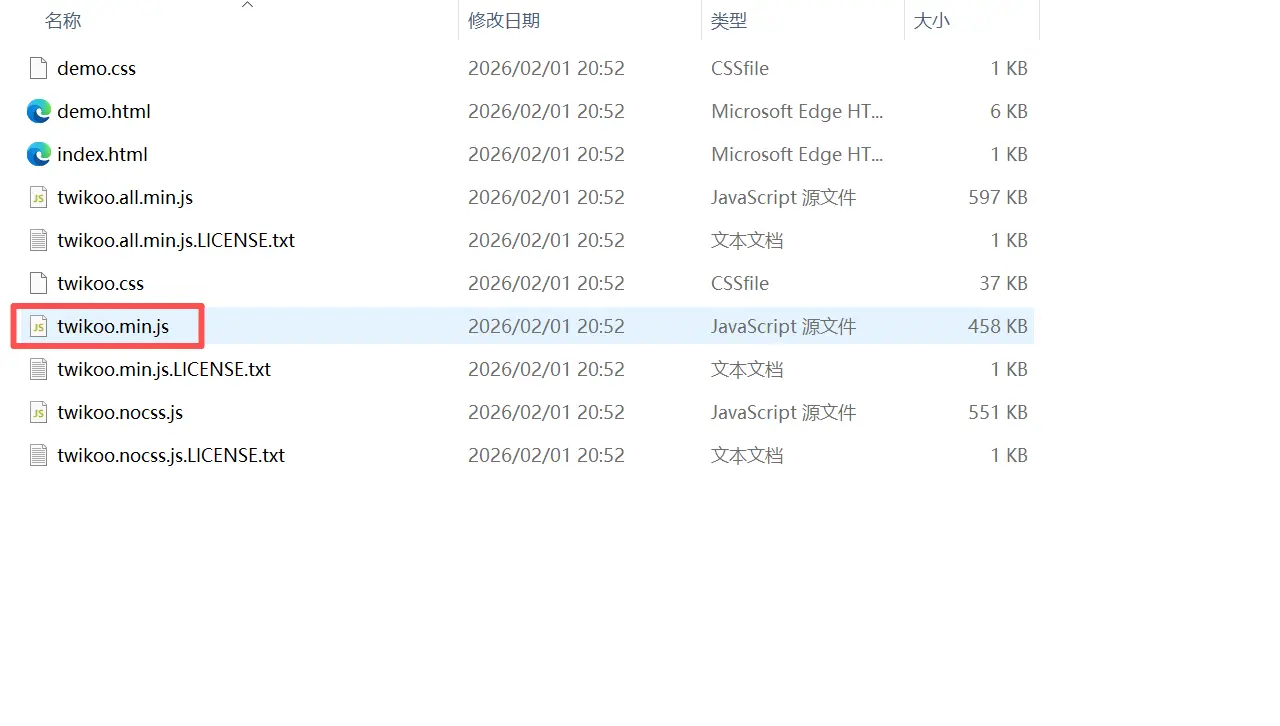
npm install --legacy-peer-depsnpm run build很快就能在dist目录看到编译后的js文件了。
使用
将编译好的twikoo.min.js放入public/twikoo文件夹中,并在astro文件引用自编译的twikoojs文件。
script.src = '/twikoo/twikoo.min.js';使用CSS
这里使用Cherry大佬写的css文件,适配Fuwari和深色模式。
我自己对其进行了一点修改,可在代码后面附上使得加载评论时转圈的图标会居中,更好看。
NOTE代码由AI生成,请仔细辨别
/* 加载图标居中 */.el-loading-mask { display: flex; justify-content: center; align-items: center;}
.el-loading-spinner { display: flex; justify-content: center; align-items: center; margin: 0 auto;}区域指示
可以给你的评论区域左上角添加一个小标题说明这是评论区。
同时这段文字支持随黑夜模式变色。
<div class="flex items-center mb-4"> <div class="w-1 h-5 rounded-md bg-[var(--primary)] mr-3"></div> <h2 class="text-xl font-bold dark:text-white">评论</h2></div> 🛠️ 修复Twikoo在Fuwari中的bug
https://blog.hachimi2333.top/posts/17/